Door View: Control Your Event in Real Time
Every event night runs on the same three questions: how many people are in, who has not arrived, and is the door keeping up? Door View, live now in the Creator Portal, answers all three on one screen, in real time, from any device at the venue.
Scan tickets & track progress
Door View is your home base for scanning, simple point the camera at a ticket's QR code and it is checked, validated, and counted in one motion. As scans land, the attendance count updates in real time with a ticket type breakdown underneath, so you can monitor all ticket types and see what to expect for your big event.
Charting the event as it happens
Check-ins plot over time by ticket type, so the shape of your night is visible while it is still happening. It tells you when to schedule a second scanner next time, and whether your openers actually pull people through the door.
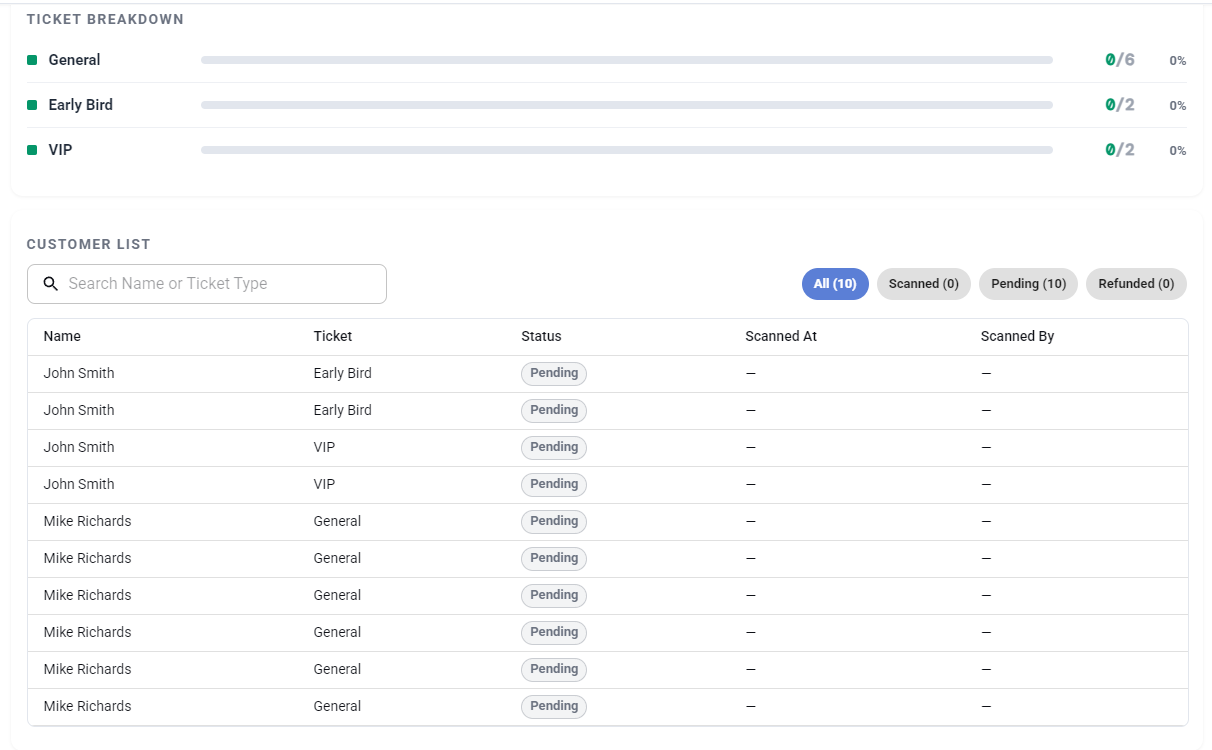
Every scan has a name and a time
Beneath the counts, Door View keeps a complete record: every ticket's status — scanned, pending, refunded — plus who scanned it and when. When someone at the door says "my ticket was already used," you are not guessing; you can see the scan, the time, and the staffer, on the spot. That chain of custody turns door disputes from arguments into lookups. For the fundamentals of fast, secure scanning, see the QR ticket scanning guide.
Fix problems without leaving the door
The classic door problem of "I can't find my ticket" has a one-tap answer: quick ticket resend. The ticket goes straight back to the buyer's email while they stand there, they open it, you scan it, the line moves. No support calls needed, no need to sort it out tomorrow, and no need to make a judgement call about waving somebody through.
For everything else that can wobble on event night, keep handling event-day problems in your back pocket.
Try it before doors
Door View is live for every event. Sign in at Creator Login, open your event, and run a test scan before the night — it takes a minute and settles everyone's nerves. Pair it with guest lists so scans and list check-ins live side by side.
Interested in partnering? We can help!
Our team consults on your events — planning, ticket strategy, strategic partnerships, and best practices on running the event itself. Every new creator gets FREE personalized onboarding and help. Talk to a real person before you sell a single ticket.